Python Programming · Week 2
Numbers and
Calculation
Hyeongmin Lee · SeoulTech, Dept. of Electronic Engineering
Last time
a computer =
a very fast calculator
This week, we use it as one.
By the end of this week: take any formula from your other classes, type it in, get the answer.
Two ways to run Python
Both from the practice video.
the prompt
>>> 3 + 4
7
>>> ▌
type one line · Python answers right away
a file
hello.py
print("Good morning")
print("Good afternoon")
save the lines · run them all at once
this video: the prompt · files come back near the end
Two kinds of numbers
int
3 -7 0 365
whole numbers · for counting
short for integer
float
3.5 -0.001 2.0
with a decimal point · for measuring
short for floating point: the point can move · 0.035 · 3.5 · 350.0
2 and 2.0 · same value · different kinds
Writing math in Python
3 * 4
7 / 2
2 ** 10
(3 + 5) / 2
one line · keyboard symbols only · no ×, no ÷, no fractions
Python reads exactly what you type
spaces are optional
we add them so the line is easy to read
>>> 3+4
no commas inside a number
write 1000000, or 1_000_000
>>> 1,000,000
^ is not power
write 2 ** 10
>>> 2 ^ 10
no error, just a wrong answer: the worst case · an error message is good news
The four you know
>>> 3 + 4
7
>>> 10 - 3
7
>>> 6 * 7
42
>>> 7 / 2
3.5
one more
>>> 6 / 2
3.0
/ always gives a float
even when the answer is a whole number
Quotient and remainder
258 minutes. How many hours?
>>> 258 / 60
4.3
true, but we want hours and minutes
>>> 258 // 60
4
// how many times it fits · the fraction is thrown away
>>> 258 % 60
18
% what is left over
4 hours and 18 minutes · they always come as a pair
Power
>>> 2 ** 10
1024
>>> 2 ** 100
1267650600228229401496703205376
an int has no size limit · a calculator gives up, Python keeps counting
Very small, very big
An answer that looks strange the first time.
>>> 1 / 1000000
1e-06
>>> 3e8
300000000.0
e means “times ten to the power of”. It is still a float.
int or float?
What kind of number comes out.
int with int → int
for + - * ** // %
>>> 3 + 4
7
/ → always float
even when it divides evenly
>>> 6 / 2
3.0
one float anywhere → float
the float wins
>>> 3 + 4.0
7.0
No computer on the exam. These three rules are how you predict the answer.
Order of operations
>>> 2 + 3 * 4
14
>>> (2 + 3) * 4
20
first to last
- 1( )
- 2**
- 3* / // %
- 4+ -
same level: left to right
Not sure? Add parentheses.
Try this
>>> 0.1 + 0.2
0.30000000000000004
not a typo · not a bug
Why: computers count in base 2
Inside, there are only two digits: 0 and 1.
base 10 · by hand
1 / 3 = 0.33333333…
never ends · so you round it
base 2 · in the computer
0.1 = 0.000110011…
never ends · so the computer rounds it
>>> 1 / 3
0.3333333333333333
the computer rounds 1 / 3 as well: sixteen digits, then it stops
a float keeps about 16 digits · the error hides far behind the point · every language does this
ints never do this: 1 + 2 is exactly 3 · int = exact, float = approximate
From the prompt to a file
The same math, saved in calc.py and run.
3 * 7(nothing)
a file is not the prompt · nobody shows the answer for you
print(3 * 7)21
in a file, you call print() yourself
the prompt: quick checks, gone when you close it · a file: saved, run again any time · the practice video uses both
print() computes first
expression: code that becomes a value · value: the answer · print shows the value
print(3 * 7)21
print("3 * 7")3 * 7
quotes make it text · no math inside quotes
One line of engineering
Two resistors in parallel. You do not need the physics, only the shape.
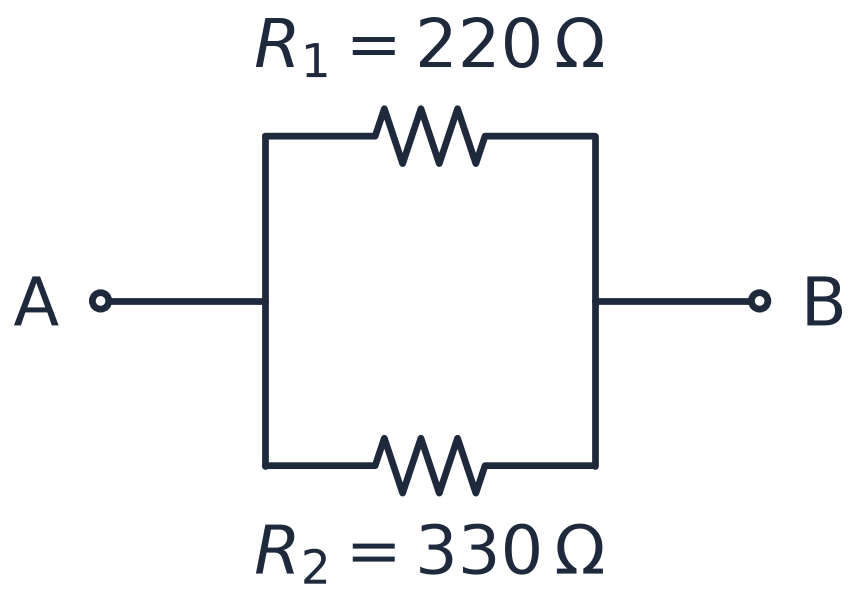
>>> 1/220 + 1/330
0.007575757575757576
>>> 1 / (1/220 + 1/330)
132.0
piece by piece, checked at the prompt · a formula from your major, one line of Python
Next steps
Next: the practice video.
Have Python open. Type everything with me.
See you in class.